We built the XtoSCORM SCORM viewer for ourselves, to check that every package we converted launched and tracked correctly. Then we noticed that about half of the people visiting XtoSCORM were coming for the viewer.
Most of them were not just testing. They were trying to get a course in front of someone else: a client, a subject matter expert, a manager who has to sign it off. And the usual way of doing that is slow. Email the zip, the reviewer cannot open it, upload it to a test LMS, create accounts, then collect feedback from three different email threads.
October fixes that. The SCORM viewer is now a review tool: one link, comments next to the course, and a record of how each reviewer got on.
Here is everything that shipped this month.
- Share a course as one review link
- Comments next to the course
- See how each reviewer got on
- Manage everything on the Shared Links page
- A more accurate SCORM player
- Free sample SCORM packages
- Smaller updates
Share a Course as One Review Link
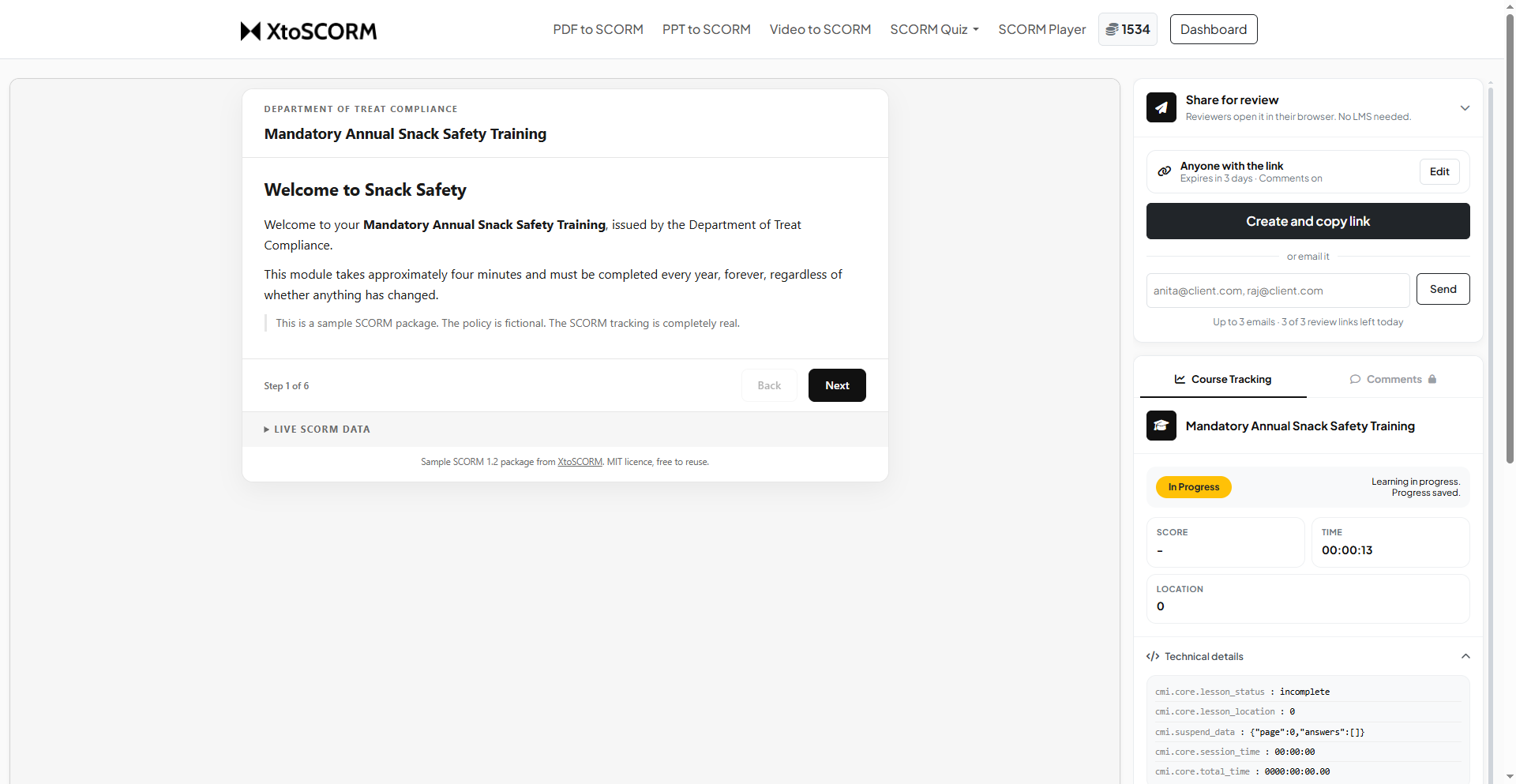
Upload a SCORM package to the SCORM viewer, check that it works, then press Share. You get a short link that opens the course straight in the reviewer’s browser. No LMS, no test accounts, no zip attachments.
Choose who can open it
Every link has one of three access levels:
- Public: anyone with the link can open it, with no sign-in. Best for quick checks with people you trust.
- Signed-in users: anyone with the link can open it after signing in, so you know exactly who opened it.
- Only these emails: only the people you list can open it, and they must sign in with that email address. Use this for client work and anything confidential.
Send it or copy it
You can either send the link by email to up to three people straight from XtoSCORM, with an optional note telling them what to check, or simply create the link and paste it into Teams, Slack or your own email.
Links expire on their own
Every link expires after one, two or three days, your choice. While a link is active the course stays available. When it expires, reviewers see a clear “link expired” page rather than a broken course, and you can create a new link any time.
Comments Next to the Course
Reviewers can leave comments in a panel right beside the course while they go through it. No more screenshots pasted into emails, and no more guessing which version a comment was about.
Each link has its own comment thread, so feedback on version one stays separate from feedback on version two. When a reviewer comments, you get an email. When you reply, the people who commented earlier hear about it too.
Comments are on by default. If you only want people to look, not discuss, switch them off for that link.
See How Each Reviewer Got On
Because the course runs in a real SCORM player, every reviewer’s session is tracked just as it would be in an LMS. For each person who opens your link you can see their status, score and time spent.
That turns a review into a test. If your client passes the quiz but your SME fails it, you know there is a question to look at before launch. Signed-in reviewers appear by name; people who open a public link appear as a guest.
Manage Everything on the Shared Links Page
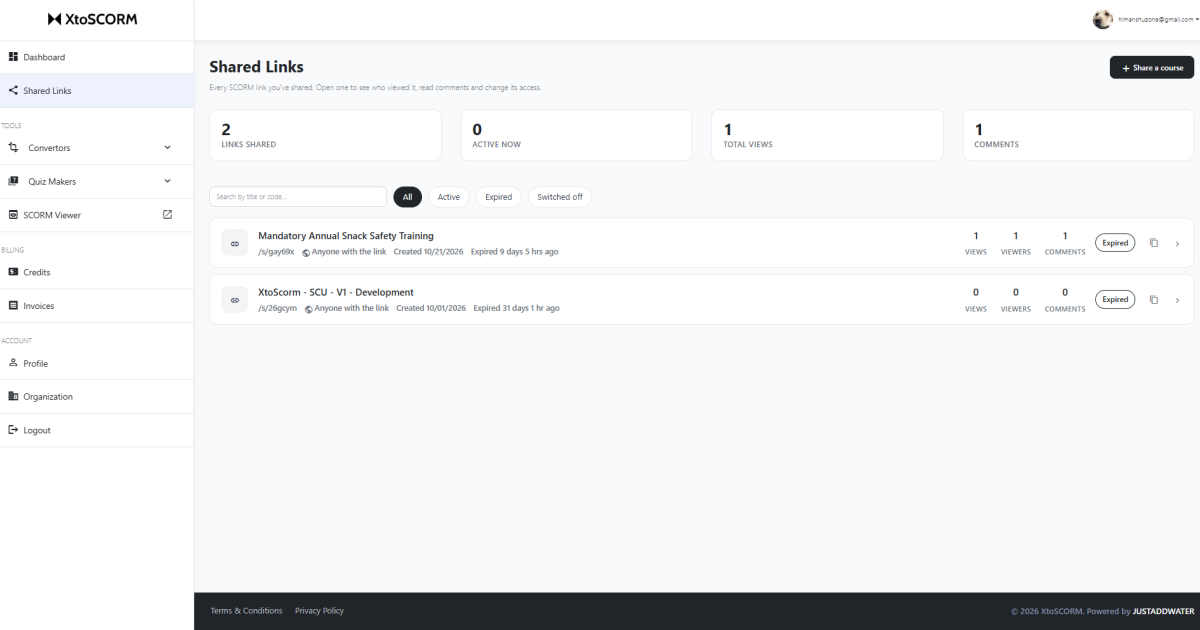
A new Shared Links page in your dashboard lists every link you have created, whether it is active or expired, and how many views, viewers and comments it has.
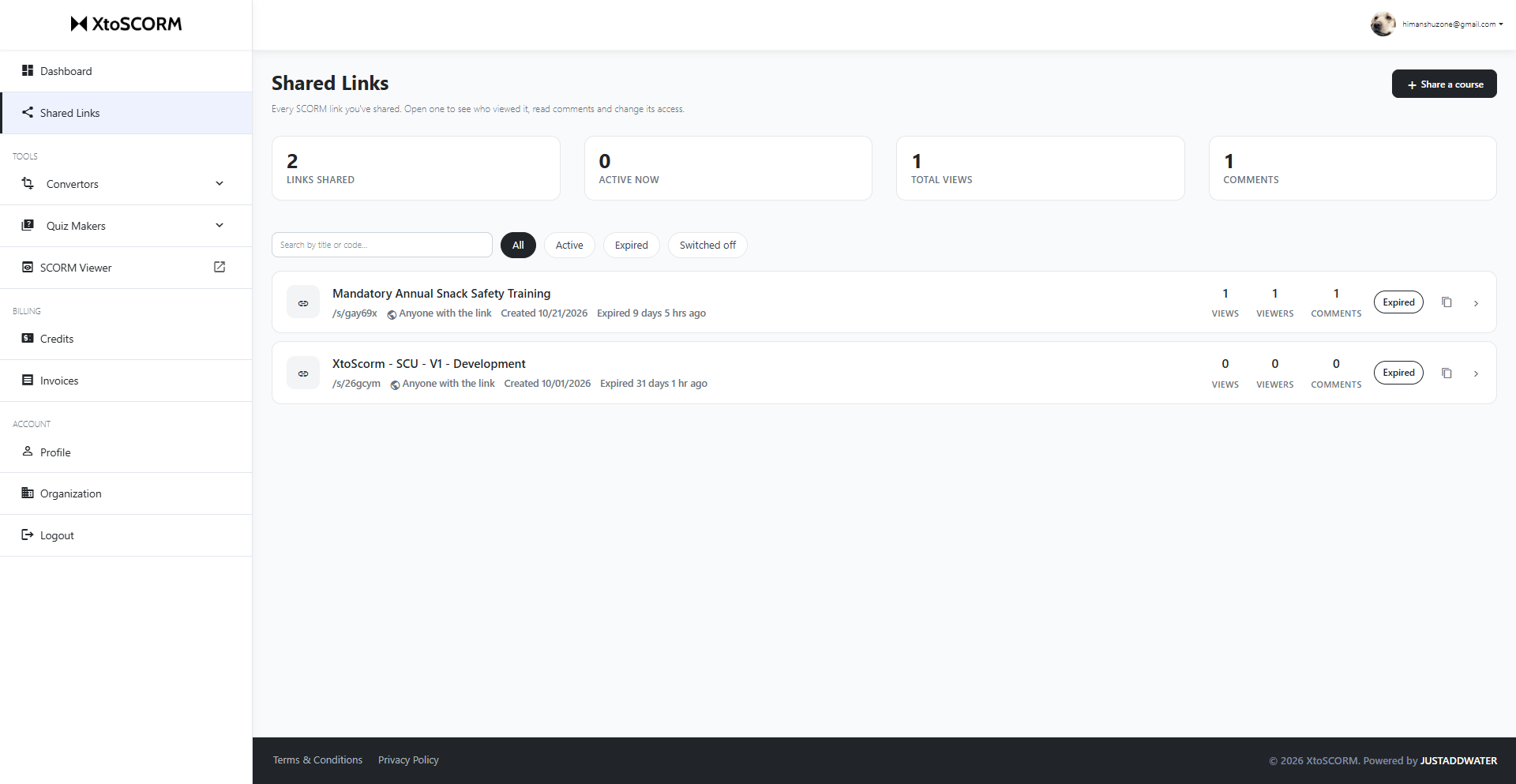
Open any link to change it after sending:
- switch the access level
- change the expiry, or expire it right now
- turn comments on or off
- email it to more people
- delete it
You can also see its activity, including when it was last viewed.
Each time you create a link, XtoSCORM asks you to confirm that you have the right to share the content, and you get a copy of every link by email for your records. Every shared course also has a Report this course link, so anyone who receives something they should not have can tell us. There is a daily limit on new share links per account, which keeps the feature fast and free of abuse.
A More Accurate SCORM Player
A review tool is only useful if the tracking you see is the tracking your LMS will record. So the player itself got a major upgrade this month:
- SCORM 1.2 and SCORM 2004 runtimes, each following its own data model and error codes.
- Reliable saving and resume: progress is saved as the course reports it, so closing the tab and coming back picks up where you left off.
- Multi-SCO courses: packages with several lessons now show a lesson list, track each lesson separately, and let you move between them.
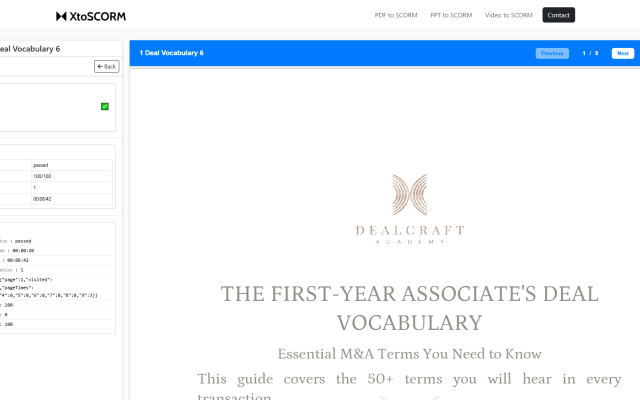
- Live SCORM data: a panel beside the course shows status, score, time and the raw values the course is sending, such as
cmi.core.lesson_statusandcmi.suspend_data, as they change.
One honest note: the player does not apply SCORM 2004 sequencing rules, and every LMS behaves slightly differently. Use it to catch problems early, then do a final check in your own LMS before launch.
Free Sample SCORM Packages
Need a SCORM file to test your LMS, your player or this new review flow? The new SCORM example page has seven free sample packages to download, covering SCORM 1.2 and SCORM 2004. Between them they test completion, scores, quiz answers, resume and multi-SCO navigation.
They are MIT licensed, so you can use them however you like. Each one also has a Try in SCORM player button that opens it straight in the viewer, no download needed.
Smaller Updates
- Bigger SCORM uploads in the viewer: the SCORM package upload limit has doubled from 50 MB to 100 MB, so larger courses can be tested.
- Full-screen defaults for teams: organization owners can set whether PDF and PPT courses open with the header and footer in full-screen mode, and new conversions follow that setting.
- Fewer interruptions in the quiz builder: you are only asked to confirm before leaving if you have actually typed something.
- New homepage and SCORM viewer page: every tool is now one click from the homepage, and the viewer page shows both jobs side by side, testing and review.
- Fixes: watermark placement, team member organization settings, and several security and session improvements.
What Shipped in October
- 🔗 Review links: share a SCORM course as one link, with three access levels and expiry of one to three days.
- 💬 Comments: one thread per link, next to the course, with email notifications.
- ✅ Reviewer results: status, score and time for everyone who opens your link.
- 🗂️ Shared Links page: change, expire or delete any link after sending it.
- 🎯 SCORM player upgrade: SCORM 1.2 and 2004 runtimes, multi-SCO lessons, reliable resume and live SCORM data.
- 📦 Sample packages: seven free SCORM 1.2 and 2004 test courses.
All of it is live now. Upload a course, press Share, and send your next review as a link instead of a zip file. If something does not work the way you expect, use the Report an Issue link in the footer. We read every submission.