June’s update is all about giving you more control. We added Theme and Navigation settings so your SCORM player can look and feel like your brand, and we added direct support for YouTube links and HLS streams in the Video to SCORM converter. Here’s what’s new.
- Theme & Navigation Settings: brand and localize your SCORM player
- YouTube & HLS Support: convert streaming video directly to SCORM
Theme & Navigation Settings: Brand and Localize Your SCORM Player
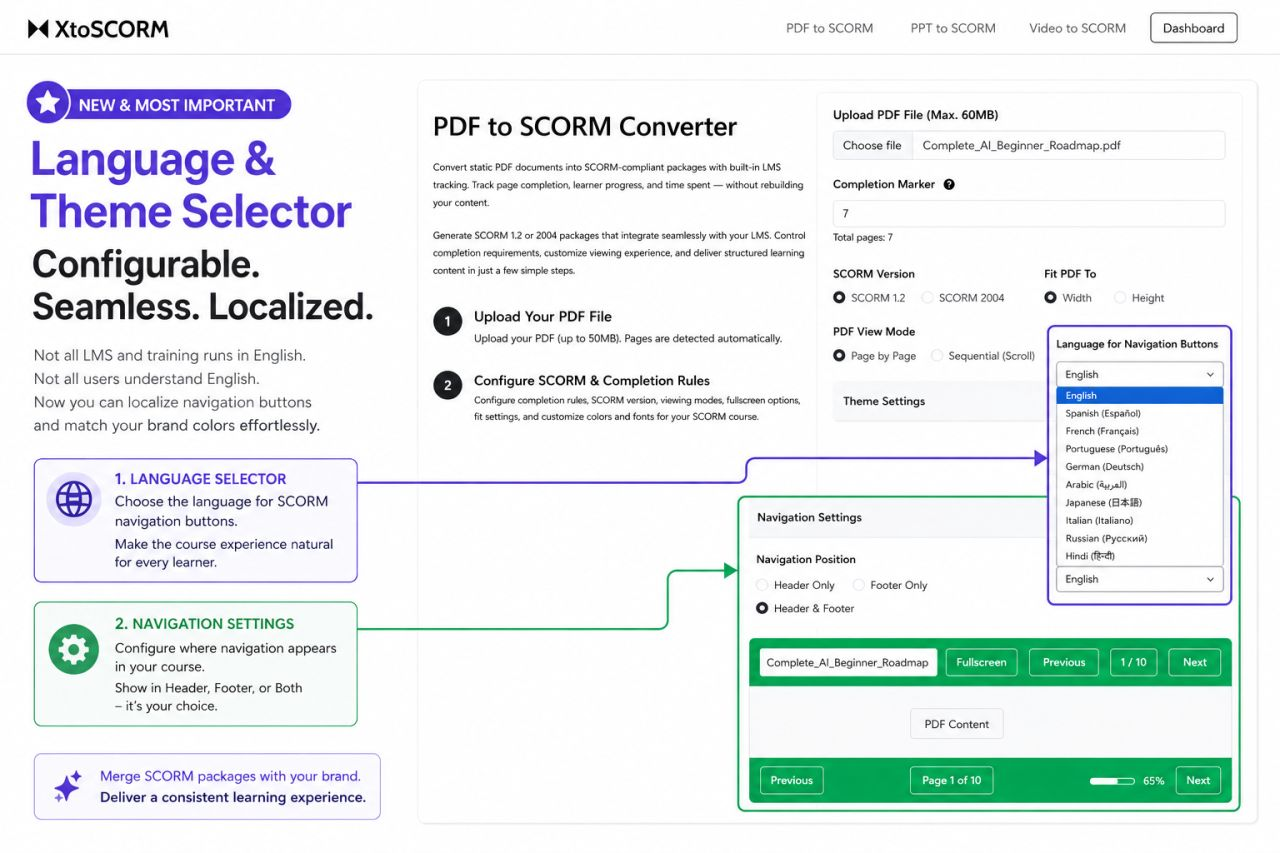
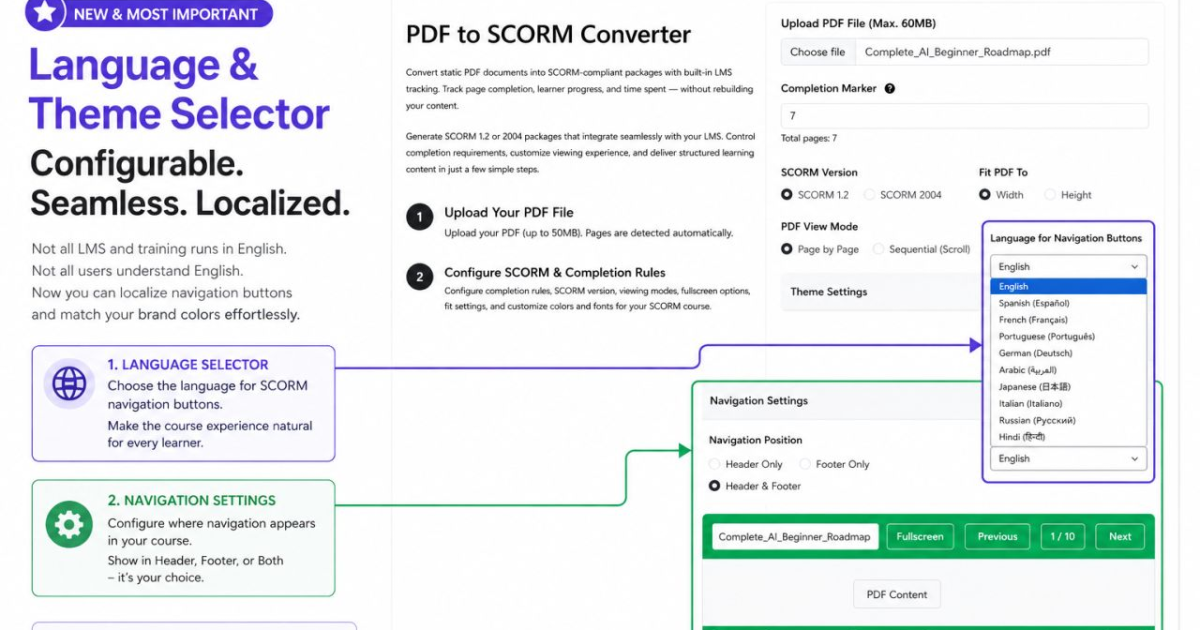
Every SCORM package you generate from PDF or PPT now comes with its own Theme Settings and Navigation Settings. You can now control how your SCORM player looks and where its navigation appears, without writing a single line of code.
Language Selector for Navigation Buttons
Not every LMS user trains in English. With the new language selector, you can localize your navigation buttons, things like Next, Previous, and Page X of Y, into Spanish, French, Portuguese, German, Arabic, Japanese, Italian, Russian, or Hindi. This makes the course experience feel native to learners no matter which country or team they’re in, without needing to rebuild the course in another language.
Navigation Position
You can also choose where navigation controls appear inside the player:
- Header Only: navigation buttons sit at the top of the course window.
- Footer Only: navigation buttons sit at the bottom.
- Header & Footer: navigation appears in both places, useful for longer documents where learners shouldn’t have to scroll back up just to move to the next page.
Combined with Theme Settings to match your brand colors, this gives you a fully customized, localized SCORM player generated automatically from your source file, with no manual editing of the exported package required.
Why this matters
Until now, customizing the look of a SCORM package usually meant accepting the default player or manually editing the exported HTML and CSS files, something most course creators don’t have the time or skills for. With Theme and Navigation Settings built directly into the converter, this becomes a few clicks during conversion, before you ever download the package.
Available now on the PDF to SCORM and PPT to SCORM converters.
YouTube & HLS Support in the Video to SCORM Converter
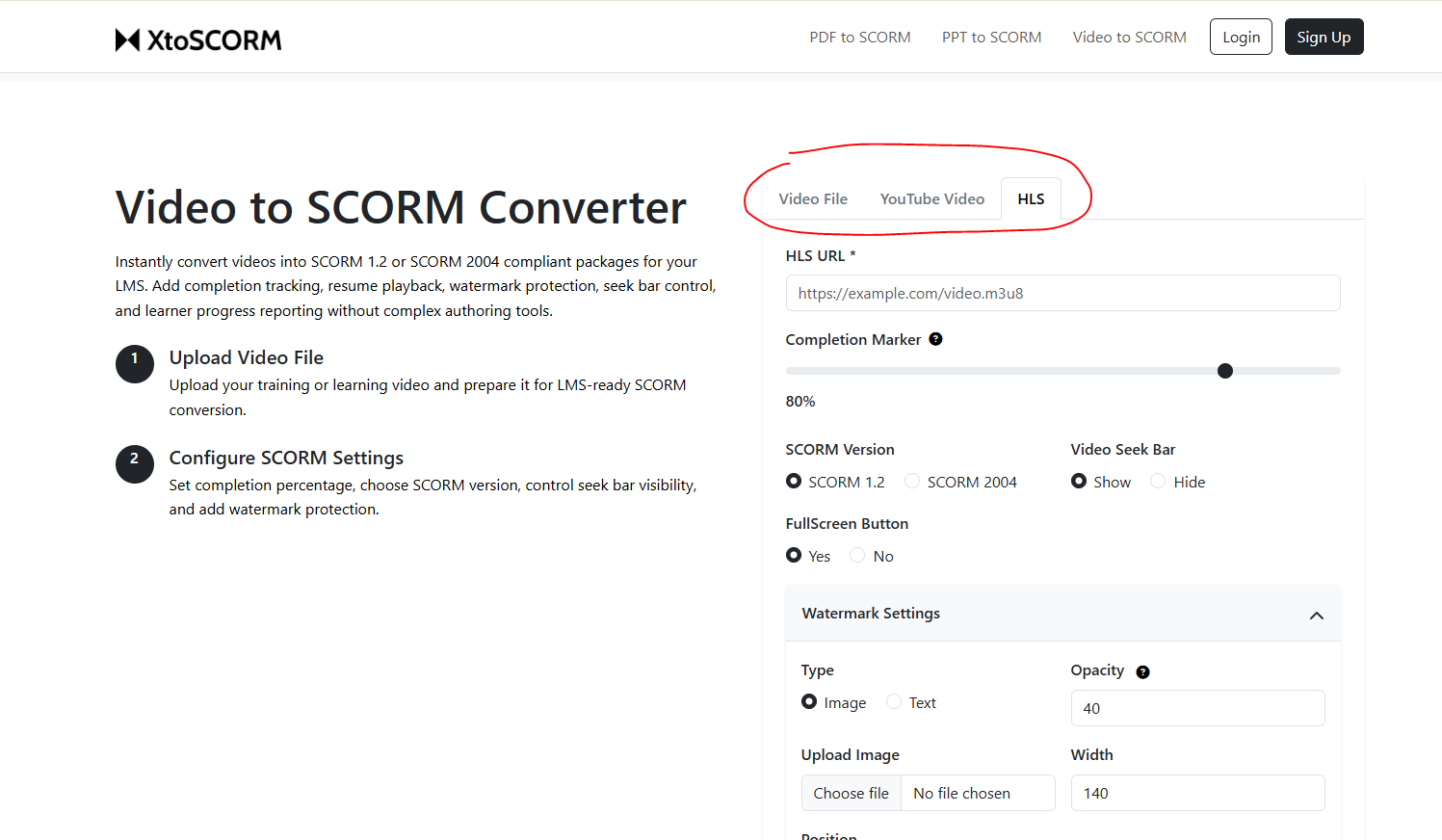
The Video to SCORM Converter no longer requires you to upload a video file at all. You can now convert directly from a YouTube link or an HLS stream (.m3u8) into a fully tracked SCORM package.
YouTube to SCORM
If your training content already lives on YouTube, whether it’s a public video, an unlisted company channel upload, or a recorded webinar, you can now paste the YouTube URL directly into XtoSCORM and generate a SCORM 1.2 or SCORM 2004 package with completion tracking, time tracking, and progress reporting, without downloading or re-uploading anything.
This is especially useful for organizations that already manage their video library on YouTube and just need an LMS-trackable wrapper around it for compliance or certification purposes.
HLS Stream Support
For teams delivering video through CDN-hosted HLS streams (.m3u8 playlists), common in enterprise video platforms, Vimeo Pro, Cloudflare Stream, and AWS-based video pipelines, XtoSCORM can now ingest the stream URL directly. This avoids the need to download large source files just to convert them, and it works well with adaptive-bitrate streaming setups where the video is already optimized for different network conditions.
Why this matters for LMS content
Most video to SCORM tools assume you have a single local video file sitting on your computer. In practice, a lot of training video already lives somewhere else, on YouTube, on a CDN, or on a streaming platform, and re-downloading it just to re-upload it for conversion wastes time and storage. With direct YouTube and HLS support, XtoSCORM fits into existing video workflows instead of forcing a new one.
Try the Video to SCORM Converter
What’s New This Month
Quick recap of June’s release:
- 🌐 Language Selector for navigation buttons, localize Next, Previous, and Page X of Y into 9 languages.
- 🧭 Navigation Position control, choose Header Only, Footer Only, or Header & Footer.
- ▶️ YouTube to SCORM, convert directly from a YouTube link, no download required.
- 📡 HLS Stream Support, convert .m3u8 streams from CDNs and enterprise video platforms directly to SCORM.
All features are live now and free to use. Got feedback or found something off? Use the Report an Issue link in the footer, we read every submission.